How it works?
LeafKVM is a fully self-contained KVM-over-IP device. It captures video from the target machine, emulates keyboard/mouse input, streams everything through the network, and exposes a clean Web UI and an on-device touchscreen interface.
This section explains how the whole system works, from high-level concepts to the internal data flow inside the RV1106 SoC.
Block Diagram
Section titled “Block Diagram”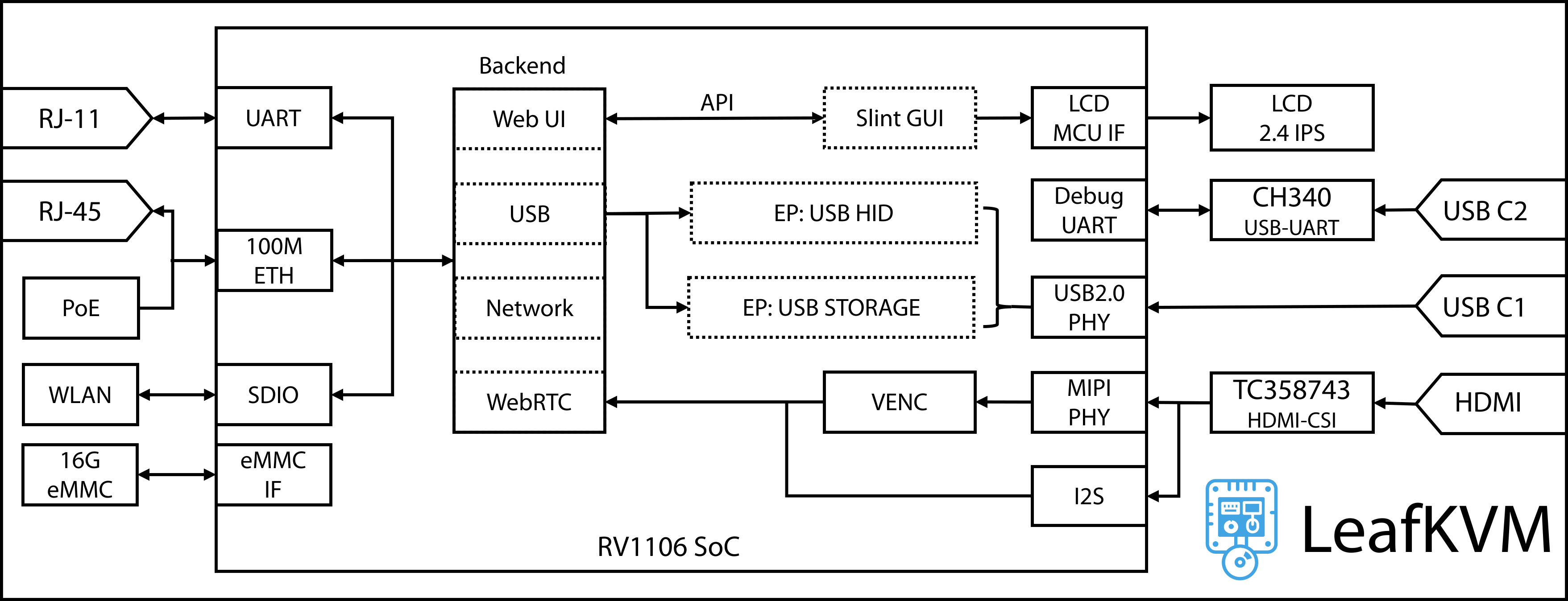
1. The basic idea
Section titled “1. The basic idea”At its core, a KVM device needs to do three things:
-
See what the target computer displays
— by capturing HDMI video/audio. -
Control the target computer
— by emulating a USB keyboard, mouse, or storage device. -
Send everything to you remotely
— through Ethernet or Wi-Fi, using a browser-friendly Web UI.
LeafKVM integrates all of this into a compact, wireless, touchscreen-powered device.
2. Input interfaces (from the target machine)
Section titled “2. Input interfaces (from the target machine)”HDMI → CSI bridge
Section titled “HDMI → CSI bridge”The TC358743 receives HDMI from the target device and:
- converts video into a CSI-2 stream that the RV1106 SoC can ingest.
- splits audio into an I²S stream. (connected to the SoC’s audio interface)
USB (to the target)
Section titled “USB (to the target)”LeafKVM behaves like a physical USB device:
- USB HID → Keyboard + Mouse emulation
- USB Storage → Virtual Media / ISO mount
These are implemented through the RV1106’s internal USB 2.0 PHY, and each endpoint is emulated by the backend.
3. Networking and connectivity
Section titled “3. Networking and connectivity”LeafKVM connects to your control device in two primary ways:
- Ethernet (RJ-45) — ncludes optional PoE for power
- Wi-Fi (802.11ac) via SDIO module
Additional auxiliary interfaces include:
- Local touchscreen — no PC required for configuration
- Extension I/O (RJ-11) — auxiliary serial interface for external control
4. Internal architecture (RV1106 SoC)
Section titled “4. Internal architecture (RV1106 SoC)”Inside the SoC, several subsystems work together:
Web Backend
Section titled “Web Backend”- Provides HTTP/WebSocket APIs for the browser UI
- Handles device settings, Wi-Fi setup, USB mode control
- Manages WebRTC sessions for remote video streaming
Video Encoder (VENC)
Section titled “Video Encoder (VENC)”- Receives CSI frames from the HDMI bridge
- Encodes them into H.264/H.265
- Streams them to the browser with low latency
USB Endpoint Engine
Section titled “USB Endpoint Engine”- Implements software-defined USB HID and USB Storage
- Allows injecting keystrokes, mouse movement, or mounting ISOs
Slint GUI Engine
Section titled “Slint GUI Engine”- Renders the on-device 2.4” IPS touchscreen UI
- Communicates with backend through internal (Web) APIs
5. Output interfaces (to the user)
Section titled “5. Output interfaces (to the user)”-
Web UI
Responsive interface for video preview, keyboard input, file transfer, and device control. -
Touchscreen UI
Local configuration options, live HDMI preview, network setup, ISO mounting. -
Serial console (optional)
Access through USB-C2 when CH340 is enabled.
6. Putting it all together
Section titled “6. Putting it all together”Here’s the full data flow:
- Target outputs HDMI → TC358743 → CSI → RV1106 encoder
- Encoded video → WebRTC → your browser
- Your keyboard/mouse actions → Web UI → USB HID endpoints → Target
- ISO images → Virtual USB Storage → Target
- Local control → Slint GUI → Backend → Network/USB subsystems
© 2026 LeafKVM Team
Contact